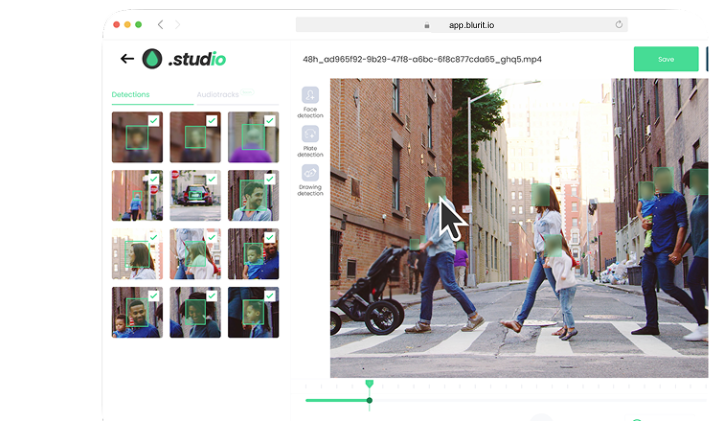
If you want to know exactly what Blurit’s browser-based tool is and how it works, this is your answer: Blurit.io Studio is Blurit’s tool for automatically detecting and blurring faces and license plates in images and video, available at app.blurit.io. It’s the same technology used by Blurit’s API and self-managed deployments, packaged into a simple interface anyone can use directly in their browser.
What Blurit.io Studio Does
Blurit.io Studio uses AI to scan an image or video, detect every face and license plate it finds, and apply the redaction effect you choose. Instead of manually drawing a mask over each one — frame by frame, for video — the system tracks detections automatically and lets you review the result before exporting.
Key Features
Automatic AI detection. Faces and license plates are identified without manual selection, including across moving footage.
Manual refinement. Detected elements are highlighted so you can adjust, deactivate, or add missed detections before finalizing your export.
Batch processing. Upload a zip file to process multiple images or video clips in a single run, instead of one at a time.
Multiple export options. Download the processed file directly, or export detection data as JSON if you need it for your own systems.
Built to scale beyond the browser. For regular or high-volume use, the same detection engine is available through Blurit’s REST API or as a self-managed deployment for organizations that need to keep processing inside their own infrastructure.
How to Get Started with Blurit.io Studio
- Go to app.blurit.io and create an account.
- Upload your image or video, or a zip file for batch processing.
- Choose what to blur — faces, license plates, or both.
- Let the AI run detection, then review the result.
- Export your file, or open the editor first if you need to adjust any detections.
For a more detailed walkthrough, see our guides on how to blur a face and how to blur images and videos online.
Pricing: What to Expect
Blurit.io Studio offers a free trial so you can test detection quality before committing to a plan. Paid plans scale based on credits, and businesses with larger or continuous processing needs typically move to the API or self-managed deployment rather than the browser tool alone, or should contact support directly. For current plans and exact pricing, see Plans & Pricing.
FAQ
What’s the difference between Blurit.io Studio and the Blurit API? Studio is the browser interface for one-off or batch uploads. The API lets you integrate the same detection engine directly into your own software or pipeline, without using the browser tool at all.
Can I use Blurit.io Studio without an internet connection? No — Studio is browser-based and requires a connection. Organizations that need fully offline or in-house processing should look at the self-managed deployment instead.
How do I access Blurit Studio? You can learn more about Blurit Studio on its dedicated page at blurit.io/en/studio, or go directly to app.blurit.io to log in and start using it.
Is there a free trial? Yes, a free trial is available to test the tool before subscribing — see Plans & Pricing for details.